Emergency: Severe Weather App
- 4.5
- Rating
- 500.00K
- Installs
- Free
- Price

 Analysis by App-foxy
When severe weather is possible, the hardest part is often not finding information; it is getting everyone in the household to notice the same warning and know what to do next. I found Emergency: Severe Weather App most useful in that space. It is a free weather app from the American Red Cross that focuses on preparation for tornadoes, hurricanes, and earthquakes, while also delivering local weather alerts. That makes it different from a normal forecast app, which is usually built around temperatures, rain chances, and hourly planning rather than emergency readiness.
I would not install it as my only weather source for an entire year, because its purpose is narrower than a full daily forecast service. I would, however, consider it a sensible addition on a shared household device or on the phones of people who want a clearer emergency plan. Its strongest quality is the way it turns a vague concern—“What if something happens?”—into a more practical conversation about alerts, preparation, and communication.
How it works in a shared household
I can imagine using this app in a home where several people have different routines. One person may work from home, another may commute, and children or older relatives may spend parts of the day in different places. In that situation, an emergency alert is only useful if the household has already agreed on what to do. The app can support that preparation, but it cannot replace the conversation itself.
You May Also Like

 Blood Strike: 2.5 Anniversary
Blood Strike’s Loadouts Turn Every Drop Into a Tactical Gamble
A close look at Blood Strike’s custom loadouts: how fast access to signature weapons reshapes its battle royale rhythm, rewards preparation, and narrows the gap between fights.

 Pandora - Music & Podcasts
Pandora’s Music Is Easy to Start, but Harder to Recover
Pandora’s strength is its low-effort path from a seed to a station. Its weak spot is how much confidence it asks you to place in connection, setup, and quiet recovery.

 8 Ball Pool
 Is Built on Rivalries, Rematches, and Routine
A close look at the rivalries, rematches, shared routines, and unanswered safety questions that turn a quick pool match into a persistent mobile community.

 Samsung Music
’s Quiet Strength Is Playing What You Already Own
Its reach comes less from spectacle than from dependable access to a personal library. That simplicity is both the app’s strongest retention engine and its ceiling.

 AccuWeather: Weather Radar
AccuWeather Review: A Quick, Clear Forecast for Everyday Decisions
For everyday plans, the best forecast is the one you can understand quickly. AccuWeather makes rain timing, radar, and local conditions easy to act on, with a few trade-offs.

 Hill Climb Racing
Why Hill Climb Racing Still Turns Crashes Into One More Run
A tiny car, a bumpy hill and one more upgrade: Hill Climb Racing keeps resurfacing because its simple chaos makes every near-miss feel personal.
More From Our News Desk



A realistic example would be a family living in an area that occasionally faces severe storms. Rather than waiting until the sky looks threatening, one adult could open the app with the rest of the household and discuss where everyone would go during a tornado warning, who would check on a child, and how they would contact one another if mobile service became unreliable. The app becomes a prompt for planning instead of something people remember only during a crisis.
That shared-use approach is more valuable than simply placing it on a tablet and assuming everyone will look at it. A device in a common room may help people review preparation information together, but it does not automatically notify every person who is away from home. If someone spends most of the day at work or school, that person should also have access on their own phone or rely on another trusted alert source.
One detail I appreciate is that the app is not limited to a single type of disaster. Tornadoes, hurricanes, and earthquakes create very different risks, and household planning changes accordingly. A tornado plan may focus on moving quickly to a safer interior location, while hurricane preparation can involve longer-term readiness and decisions about travel. Earthquake preparation raises another set of questions about falling objects, utilities, and communication. Treating these events as interchangeable would be a mistake, and the app’s broader emergency focus encourages more than one conversation.
For shared use, I would review the relevant material before an emergency rather than trying to learn everything while an alert is active. That is a small but important distinction. During a warning, people need short, familiar actions. Preparation works best when the household has already discussed the information and adapted it to the actual home, workplace, or travel route.
What I would do before handing it to the family
My first step would be to install the app on the devices that matter most, then check that local alert behavior is understood by each person using it. I would not assume that one installation creates a household-wide system. Every person should know which device is expected to receive warnings and what to do if that device is muted, out of battery, or left somewhere else.
This is especially important with shared phones and tablets. A device used by several people can be convenient for reading preparation guidance, but it may not be the right place to depend on urgent notifications. Shared devices are often left in one room, carried by one person, or used under settings that another household member does not understand. I see the app as a useful common reference, not as proof that every person is covered.
The app is free, which removes an obvious barrier to putting it on more than one household device. Still, free installation does not eliminate the practical work of deciding who monitors alerts, who contacts relatives, and who checks on people who may need extra help. Those responsibilities should be discussed separately from the app itself.
I would also avoid giving a child the impression that an alert means they must make every decision alone. The content rating is Everyone, so the app is suitable for a broad audience, but suitability is not the same as independence. Younger users may benefit from seeing the preparation material with an adult who can explain unfamiliar terms and turn it into simple household rules.
Account boundaries and personal responsibility
One question many households have is whether a single account can manage everyone. I would not build a plan around that assumption. The safest approach is to treat each person’s device and alert setup as an individual responsibility, even when the family reviews the app together. That avoids a common failure: one person believes another person is receiving everything, while neither has actually confirmed it.
This matters for roommates as well as families. Roommates may share a living space without sharing schedules, phones, or emergency contacts. The app can be a useful reason to agree on a meeting place and a way to communicate, but it does not turn separate lives into one coordinated alert network. Each roommate should decide whether the app fits their own location and risk profile.
I would also be careful when a household member travels. Local alerts are relevant to the place where that person currently is, not necessarily to the home address everyone discusses. Someone visiting another region may need to pay attention to the device’s current location and to local emergency guidance. A family plan that only covers the house can leave travelers with the wrong expectations.
Another practical boundary is the difference between preparation content and official emergency direction. I would use the app to prepare and to stay aware, but I would still follow instructions from local authorities during an active event. No single app should be treated as the sole authority for evacuation orders, shelter availability, road closures, or changing conditions.
Coordinating when people are apart
The app is most helpful when it starts a coordination routine before anyone needs it. In my household scenario, I would agree on a short message that means “I am safe,” another that means “I need help,” and a fallback plan if the usual contact person cannot respond. These decisions are not features of the app, but they make its alerts more useful because people know what action follows the warning.
For a hurricane, coordination may need to happen earlier than people expect because travel, supplies, and family locations can change over time. For a tornado, the response window may be much shorter, so the plan needs to be simple enough for everyone to remember. For an earthquake, the first concern may be immediate safety, followed by checking whether communication and transport are still available. The app’s disaster coverage gives a household a framework for discussing these different time scales.
I would not use an alert as a substitute for directly checking on a vulnerable relative. A notification can tell a person that conditions are serious, but it cannot confirm whether an older family member heard it, whether a child is with the right adult, or whether someone has access to a safe place. A phone call, text, or prearranged contact chain remains necessary.
There is also a useful distinction between household coordination and neighborhood coordination. The app may help one family prepare, but it does not create a community response plan. If a household depends on neighbors for transportation, medical support, or help with pets, those arrangements need to be made separately. I see this as a limitation of the app’s role, not a flaw in its basic purpose.
On a shared device, I would keep the app easy to find and make sure everyone knows what it is for. That sounds basic, but emergency tools lose value when they are buried in a folder or confused with a regular forecast app. A household could review it during a calm weekend, then revisit the plan when seasons or living arrangements change.
Age, trust, and the right level of guidance
The Everyone age rating makes the app approachable for households with children, but I would still introduce it according to the child’s age and confidence. A younger child may need a calm explanation of why alerts happen and which adult to find. An older teenager may be able to help check that household members understand the plan, especially if they spend time alone at home or travel independently.
I would avoid presenting emergency information dramatically. Children can become anxious if every alert is treated as an immediate catastrophe. The better approach is to explain that alerts are signals to pay attention, then connect them to a familiar action. The app can support that conversation, while the adult decides how much detail is appropriate.
Trust is important here. People should understand that an alert does not guarantee perfect timing or complete local detail, and a lack of an alert does not mean every situation is harmless. Weather and disaster information can change quickly. I would teach household members to read the warning in context and to pay attention to local instructions rather than assuming the app answers every question.
For older adults, the main issue may be visibility, confidence, or the ability to act quickly rather than age suitability. I would sit with them during setup, explain where alerts appear, and make sure they know whom to contact. If a relative has difficulty using a smartphone, installing the app alone is not enough. A family member may need to take responsibility for checking in and explaining any warning.
The app’s association with the American Red Cross may also make it feel more trustworthy to some households, but I would still encourage people to compare its guidance with instructions from local emergency management officials. Trust should lead to preparation, not to dependence on one source.
Where it differs from ordinary weather apps
Most everyday weather apps are better for deciding whether to carry an umbrella, when to exercise outdoors, or how cold the morning will feel. They typically make the forecast the center of the experience. Emergency: Severe Weather App has a different priority: it encourages readiness for high-impact events and local alerts rather than trying to be the most complete daily weather dashboard.
That difference is the reason I would use it alongside, not necessarily instead of, a regular weather app. If I need detailed hourly conditions for a commute, a conventional forecast tool may be more convenient. If I want to think through tornado, hurricane, or earthquake preparation with my household, this app is more relevant. Choosing between them depends on whether the immediate need is routine planning or emergency readiness.
I also would not compare it directly with a dedicated government alert system as though they serve exactly the same purpose. Official local channels may be essential for evacuation instructions and area-specific orders. This app can sit within a wider safety setup, helping people prepare and notice local warnings while they continue to follow authoritative instructions.
Its focused scope is both a strength and a limitation. Someone who wants radar layers, long-range forecasts, pollen information, severe-weather maps, and travel planning in one place may find it too specialized. Someone who has never made an emergency plan may appreciate that it keeps attention on a few serious hazards instead of burying preparation beneath everyday forecast features.
Performance expectations and practical friction
The app has been available since April 14, 2015, and its current version is 5.1.1. That history suggests a product with an established place rather than a brand-new experiment, but I would still keep expectations realistic about the feel of the interface on a modern phone. Its value is primarily in the emergency information and alert purpose, not in having the newest visual design or the broadest collection of weather tools.
It requires operating system version 10 or later, so compatibility is something to check before planning to install it on an older phone or a household tablet. This is particularly relevant for families that keep an old device as an emergency backup. A device that cannot run the app should not be counted as part of the household alert plan.
Another source of friction is attention. An alert only helps if people notice it and understand what it means. Silent modes, low battery, poor connectivity, and an unattended device can all weaken the plan. I would treat the app as one layer in a safety routine and keep other sensible habits in place, including charged phones, known meeting points, and direct contact with household members.
I also would not expect the app to solve every local detail. A warning may tell you to take a serious situation seriously, but your household still has to know the safest room, the best route away from danger, and the needs of pets or people with limited mobility. Those details belong in the household plan, not in the assumption that an app can personalize every decision.
The rating is encouraging: it holds a 4.5 average from around 2.7 thousand ratings, with roughly 1.2 thousand written reviews. More than 500 thousand installs also indicate that it has reached a substantial audience. I see those figures as signs of useful adoption, not as proof that it will suit every home. Emergency tools are highly dependent on location, device habits, and whether people actually prepare before a warning arrives.
Who should install it, and who should skip it
I would recommend trying it if you live in an area where tornadoes, hurricanes, or earthquakes are realistic concerns, especially if your household has never discussed what it would do during one of those events. It is also a reasonable choice for students, renters, and people living away from their usual support network who want a straightforward prompt to think about emergency readiness.
It may be particularly useful for a household that has several people but no shared plan. The app gives adults a reason to sit down with children or older relatives and talk through warnings without waiting for a crisis. It can also help roommates identify gaps in their arrangements, such as not knowing who has a car, who needs medication, or where to meet if the building must be left.
I would skip it if your only goal is a detailed daily forecast and you already have a weather service that handles your needs better. Installing another app will not improve a commute forecast simply because it is related to weather. I would also hesitate to rely on it if you are unwilling to maintain a broader emergency plan or check local official instructions.
People who rarely use smartphone alerts may gain less from it than people who already check notifications. In that case, a printed household plan and a direct conversation may be more effective starting points. The app works best when it supports behavior that people understand, rather than when it is treated as a passive safety charm.
My household verdict
After looking at it as a shared household tool, I see Emergency: Severe Weather App as a focused companion rather than a complete weather replacement. Its purpose is clear, its free price makes household access easier, and its coverage of tornadoes, hurricanes, earthquakes, and local alerts gives families several concrete subjects to discuss. The American Red Cross identity also makes it feel suited to preparation rather than entertainment or casual forecast checking.
My main recommendation is to install it before severe weather is on the horizon, open it with the people who may depend on one another, and turn its information into simple decisions. Decide who checks on whom, where people go, how children and older relatives receive help, and what happens when someone is away from home. Then keep official local guidance in the picture and avoid assuming that one shared device covers everyone.
For me, that is the app’s real value. It does not remove uncertainty, replace local authorities, or coordinate a family automatically. It gives a household a practical starting point for doing those things better. If you want a broad daily weather dashboard, choose a more comprehensive alternative. If you want a free, Everyone-rated emergency weather app that can help your household prepare and pay attention, Emergency: Severe Weather App is a worthwhile addition—provided you use it as part of a plan, not as the plan itself.
FAQs for Emergency: Severe Weather App
01What features does the Emergency: Severe Weather App offer?
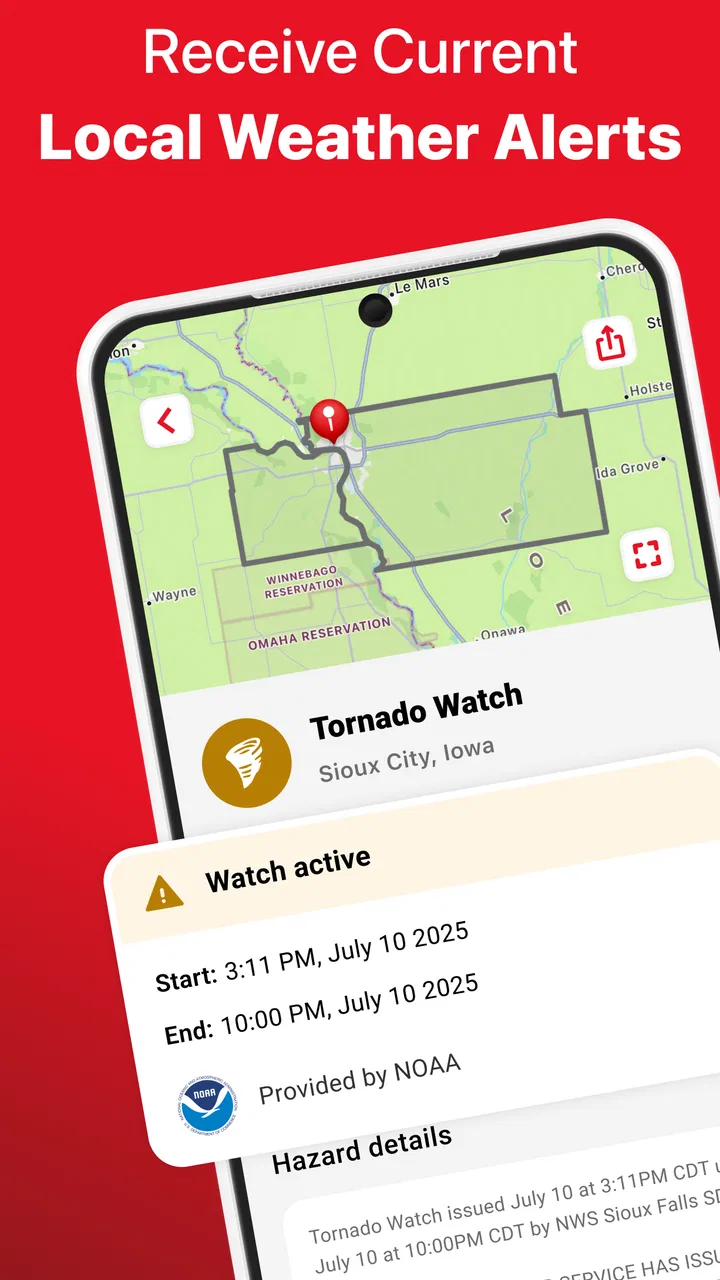
The Emergency: Severe Weather App provides real-time alerts for various weather emergencies, such as hurricanes, tornadoes, and severe storms. It includes a GPS-based alert system, customizable notifications, and a detailed map interface. Additionally, the app offers safety tips, shelter locations, and the ability to share alerts with family and friends.
02How accurate are the weather alerts provided by the app?
The app sources its data from reputable meteorological services, ensuring high accuracy in its alerts. Users receive notifications based on their real-time location, allowing for timely warnings about impending severe weather. However, it's always recommended to cross-reference with local news for the most comprehensive information.
03Is the Emergency: Severe Weather App free to use?
Yes, the app is free to download and use. However, it may offer in-app purchases for additional features, such as advanced alert settings or ad-free usage. These optional purchases are designed to enhance the user experience but are not necessary for receiving basic weather alerts and updates.
04Can I customize the types of alerts I receive?
Absolutely. The app allows users to customize the types of weather alerts they want to receive. You can set preferences for specific weather events, alert severity levels, and the regions you wish to monitor. This ensures you only receive relevant notifications, tailored to your needs and location.
05Does the app require an internet connection to function?
Yes, the Emergency: Severe Weather App requires an internet connection to receive real-time updates and alerts. While some features, like safety tips, may be available offline, a stable connection is essential for accessing the latest weather data and ensuring timely notifications.
Pros
- Real-time alerts for severe weather conditions.
- Customizable notifications for specific locations.
- Detailed radar and satellite imagery available.
- User-friendly interface with easy navigation.
- Works offline with pre-downloaded maps.
Cons
- Occasional delays in alert notifications.
- Ads can be intrusive at times.
- Limited features in the free version.
- Battery consumption can be high during use.
- Some users report occasional app crashes.

Emergency: Severe Weather App
Gallery